GRANCUT

On site and at the office

From measurements to quotes. On the app and desktop.

Draw, price, and present the piece during visits with the app. At the office, use Grancut Desktop in your browser to create quotes and organize customers, scheduling, and catalogs with the same account.

14 days free · no credit card · online desktop

PDF enviadoCliente aprovou em 8 min
Sem internetSincronizado ✓

Grancut at your office, too.

Open it in your computer browser, with more room to draw, review prices, and follow your shop’s quotes.

  • Create and edit quotes with 2D drawings, 3D previews, templates, and batches of pieces.
  • Organize customers, history, visits, and catalogs with the same account used in the app.
  • Generate PDF proposals and technical memos with dimensions, cutouts, and finishes.
  • Track orders, production and installation deadlines, and payables and receivables in your browser.

The desktop version works online, directly in your browser, with no installer to download.

Open on desktop

From measurements to closed quote

From the sketch on the tablet to the customer approving, still during the visit — no notebook, no spreadsheet, and no calling the shop for a price.

From drawing to closed deal

From measurements to closed quote

From the sketch on the tablet to the customer approving, still during the visit — no notebook, no spreadsheet, and no calling the shop for a price.

From measurements to closed quote

From the sketch on the tablet to the customer approving, still during the visit — no notebook, no spreadsheet, and no calling the shop for a price.

  1. Draw & choose material

    Build the piece to exact client specs, including sink, cooktop, and faucet cutouts. Select stone, slab thickness, and finishes — every detail is instantly priced.

  2. Preview in 3D & calculate

    Inspect the finished countertop in realistic 3D with the chosen stone and edge profile before closing the deal. Add accessories and services with automatic freight and waste calculation.

  3. Send the quote

    Send the quote link: the client opens it in the browser, spins the piece in 3D, checks the summary and approves from the phone. Whoever prefers a file still gets the PDF with your logo, technical drawing, dimensions and pricing.

New · Orders and finances

Quote approved? Follow what happens next.

From an approved order to installation and payment, organize your shop’s work in Grancut on desktop.

Orders, from approval to installation

Turn an approved quote into an order and follow each stage in a board or list.

  • Track measuring, materials, production, and installation.
  • Assign deadlines and owners and record blockers.
  • Keep checklists, files, comments, and history together.

Finances connected to orders

Organize payables and receivables with the amount and due date of each installment.

  • Set up installments with a deposit and track due dates.
  • Record partial receipts, payments, and supporting documents.
  • Filter by period and track amounts received and paid.

New in Grancut

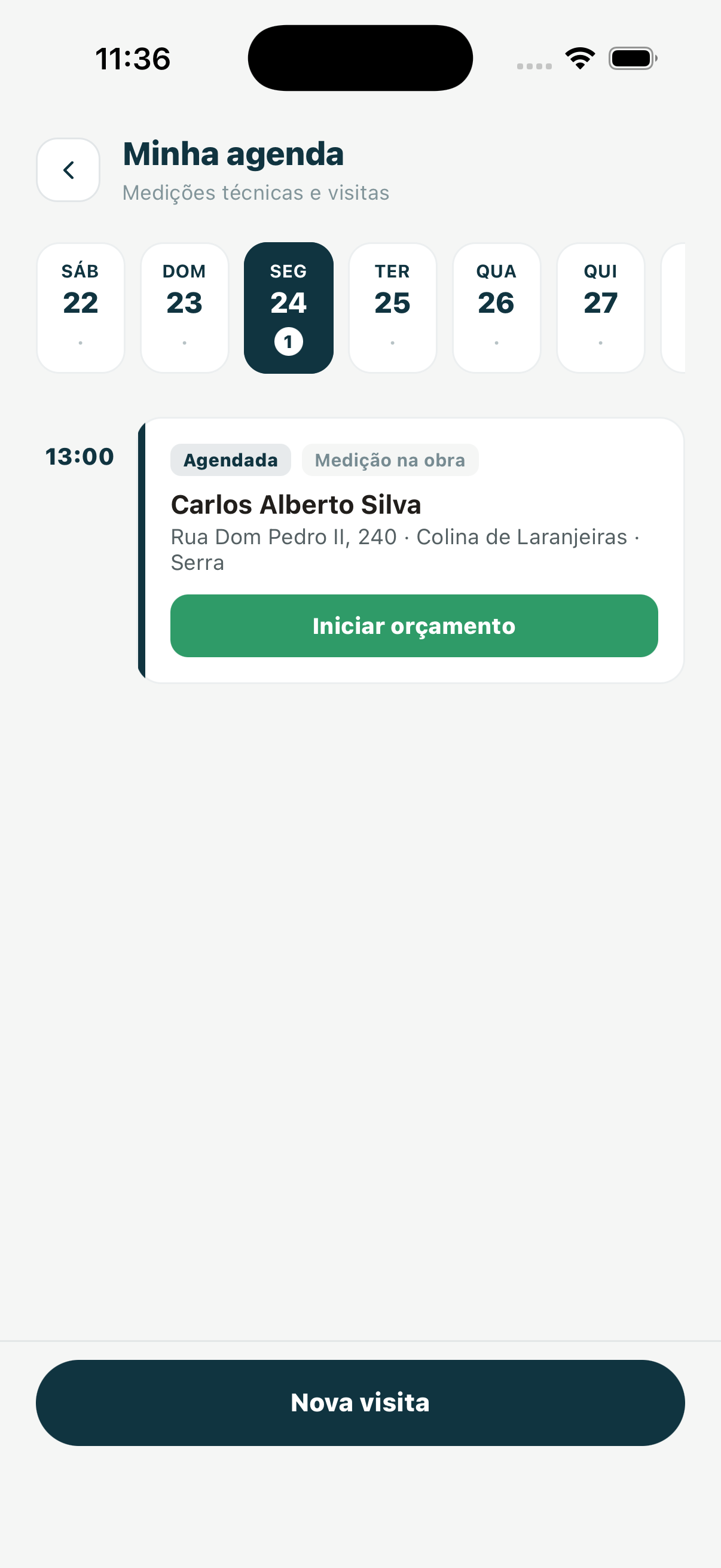
Your visit schedule, connected to every quote.

Organize measurements, technical visits, and installations without losing customer context. From confirmation to quote, everything stays in one workflow.

  • See your full day and the status of every appointment.
  • Open directions, contact the customer, and confirm visits in a few taps.
  • Notify the customer via WhatsApp when the visit is created and send a confirmation one day before.
  • Start a quote from the visit with the customer and address already linked.
Try it in Grancut
Real Grancut visit schedule screen showing the calendar, a scheduled appointment, and the action to start a quote
ConfirmedOn-site measurement

From the job site to the office, with Grancut

Drawing, pricing, and proposals with organized customers, scheduling, orders, and finances.

Offline on Android

On Android, draw, price, and generate PDFs without a signal. Desktop requires internet.

App and desktop

Use a tablet during visits or a keyboard, mouse, and larger screen at the office.

Stone catalog in 3D

Show the piece in the chosen stone before closing the deal.

Automatic Pricing

Instant material consumption, technical waste, edge finishes, and logistics.

Technical memo

Dimensions, cutouts, and finishes ready for the shop floor.

Summary for hand-off

The data organized to enter in the system you already use.

3D quote link

The client spins the piece in the browser and approves from the phone. The PDF with your logo comes along.

Free to start

Try it free for 14 days, no credit card. Eligible accounts get 14 more days by requesting assisted setup.

Grancut lives alongside the system your shop already uses.

Start with drawings and quotes while keeping the system you already use. To follow work after the sale, Grancut also offers orders and finances in the web version.

You already type it twice today

Someone writes it down at the measure and someone else enters it into the system later. What changes is the source: an organized screen with checked dimensions instead of a crumpled sheet of paper.

Grancut works at the office, too

On desktop, create and review quotes, draw in 2D, and preview in 3D. Access customers, scheduling, and catalogs in your browser with the same account as the app.

Marmovix: integration ready

With Marmovix the quote arrives there automatically, with nothing to configure. For other systems there is a documented read API — your system can pull the quotes if whoever maintains it implements that.

And when it is not automatic, it is fast

The quote summary comes out organized in PDF, text, JSON, or CSV, in the order systems ask for. Whoever enters it opens a finished screen instead of deciphering handwriting.

Countertop in Mont Blanc Quartzite One quote, from the tablet to your system
01
At the visit, with the customer Grancut
Tablet, on site or in the showroom

Piece drawn, stone chosen, and price closed in 6 minutes · PDF sent on WhatsApp

02
Later, at the office The system you already use
Entered from the summary

Dimensions, cutouts, finishes, and prices on one organized screen · text, JSON, or CSV

03
Or not even that Marmovix
Automatic integration

The quote arrives on its own, with nobody typing it again

Start free. Subscribe when it makes sense.

Try it free for 14 days, no credit card. Eligible accounts get 14 more days by requesting assisted setup. Whoever quotes decides alone — no meeting, no migration, and no need for the whole company to adopt it.

Individual

For whoever quotes on their own

R$39.90/month

  • 1 user
  • Unlimited quotes
  • Visit scheduling
  • 2D Editor & 3D Visualization
  • Material Catalog
  • Automatic Calculations
  • Mileage-based Delivery Pricing
  • Unlimited PDFs
  • Offline on Android
  • App and desktop
  • Team-shared catalog
  • Technical manufacturing cut sheet
  • Dedicated support
Start free
Most popular

Team

To share with whoever quotes alongside you

R$59.90/month

  • Up to 3 users
  • Unlimited quotes
  • Visit scheduling
  • 2D Editor & 3D Visualization
  • Material Catalog
  • Automatic Calculations
  • Mileage-based Delivery Pricing
  • Unlimited PDFs
  • Offline on Android
  • App and desktop
  • Team-shared catalog
  • Technical manufacturing cut sheet
  • Dedicated support
Start free

Enterprise

For growing fabrication businesses

R$89.90/month

  • Unlimited users
  • Unlimited quotes
  • Visit scheduling
  • 2D Editor & 3D Visualization
  • Material Catalog
  • Automatic Calculations
  • Mileage-based Delivery Pricing
  • Unlimited PDFs
  • Offline on Android
  • App and desktop
  • Team-shared catalog
  • Technical manufacturing cut sheet
  • Priority VIP support
Start free

Frequently asked questions

I already use a system at the shop. Is Grancut for me?

Yes. Keep your existing system and use Grancut to draw and quote during visits. To follow work after the sale, the web version also includes orders, payables, and receivables.

Will I have to type everything twice?

You already type it twice today: someone writes it down at the measure and someone else enters it into the system later. What changes is the source — an organized screen with checked dimensions instead of a crumpled sheet of paper. With Marmovix, not even that: the quote arrives automatically.

My system already does quotes. Why another one?

It does — at the office, later, with the customer gone. Grancut does it on the spot, with the customer looking at the stone on the screen.

Does Grancut integrate with my system?

With Marmovix the integration is automatic, with nothing to configure. For other systems there is a documented read API: your system can pull the quotes if whoever maintains it implements that. Either way, the quote summary comes out ready in PDF, text, JSON, or CSV to enter by hand in minutes.

I have no system at all. Does it work on its own?

Yes. Quotes, customers, materials, scheduling, and history live in Grancut. In the web version, you can also follow orders from approval to installation and organize payables and receivables.

Is this one more subscription?

It is less than a tenth of a single countertop. Close one extra quote in a year and it has paid for itself. And you can start free: you get 14 days free, no credit card, and eligible accounts can get 14 more days by requesting assisted setup.

Does it work offline?

On the Android app, you can draw, price, and generate PDFs without internet; data syncs when the connection returns. Grancut Desktop works online and needs a connection to access and save company data.

Where can I use Grancut?

Use the Android or iOS app on your phone or tablet during visits and Grancut Desktop in your computer browser with the same account. Desktop works online and needs no installer. The iOS app is available on the App Store for iPhone and iPad.

Is there an iPhone or iPad (iOS) app for Grancut?

Yes. Grancut is on the App Store for iPhone and iPad: download it, sign in with the same account you use on Android and desktop, and pick up where you left off.

Do I need to set up my price list?

Yes, just once: materials, labor, edge finishes, and delivery. After that every new quote comes out priced with your numbers.

Does it support granite, quartz, and marble?

Yes. The catalog supports any type of stone, with supplier, origin, and price per thickness, and shows the piece in 3D in the chosen stone.

Does the client need to install anything to see the quote?

No. The link opens in a phone or desktop browser, with the 3D drawing, the summary and the approve button. You get an email as soon as they approve. Anyone who prefers a file still gets the PDF.


Your next quote, on the app or desktop.

14 days free, no credit card. Keep the system you already use.